Table of Contents
The question nobody asks politely
“Can WordPress really handle attendance for our school?”
We hear this from administrators every week. They ask it with the same tone you’d use to ask if a bicycle can tow a trailer. And honestly, it is a fair question. WordPress started as blogging software. The idea of running daily roll call for 1,200 students through it sounds like a stress test, not a serious plan.
The skepticism comes from an outdated assumption. People assume WordPress attendance means clicking a checkbox, waiting for a full page reload, clicking another box, and waiting again. One HTTP request per student. That naive model would buckle at 40 students, let alone 1,000.
CodeClove School Management Pro works differently. Here is what happens under the hood, how the database handles the load, and where WordPress genuinely hits its limits.
Why the naive approach breaks
If you built attendance the old WordPress way, you would probably create a custom post type called attendance and save one post per student per day. For a school with 1,000 students, that means 1,000 posts created every morning. Each post triggers wp_insert_post, which fires actions, updates taxonomy relationships, serializes meta entries, and flushes object caches.
At 1,000 students across 30 classes, you run 1,000 individual INSERT queries, plus meta queries, plus hook callbacks. Do that across 200 school days in an academic year and your database collects 200,000 post rows by June. The wp_posts table was never designed for high-frequency transactional logging. It works fine for the first month. By March, your roll call screen takes 8 seconds to load.
This is why most WordPress school plugins turn sluggish within a single term. They treat WordPress content tables as a general-purpose transactional database. They are not built for it.
Relational tables and atomic transactions: the difference that matters
CodeClove School Management Pro stores attendance in dedicated custom tables rather than wp_posts. The schema is lean and strictly indexed: student ID, academic session ID, unit ID, group ID, date, status (present, absent, late, on leave, half day, excused, holiday), optional note, teacher ID, and timestamps.
When a teacher submits attendance for a class of 45 students, the plugin processes the entire register inside an atomic MySQL transaction via Transaction::run(). The service checks existing records and executes clean updates or inserts within that isolated transaction, avoiding table locks on standard WordPress tables:
-- Dedicated indexed table: {prefix}codeclove_attendance_records
-- Composite unique index on (student_id, attendance_date, academic_session_id)
SELECT id FROM {prefix}codeclove_attendance_records
WHERE student_id = 101 AND attendance_date = '2026-09-09' AND academic_session_id = 1 LIMIT 1;

UPDATE {prefix}codeclove_attendance_records
SET status = 'present', updated_at = NOW() WHERE id = 4520;
All writes execute within a single database transaction. If a teacher makes a correction and resubmits later in the morning, the system updates existing rows instead of generating duplicate entries. No post-meta sprawl, no cache invalidation cascades across your blog.
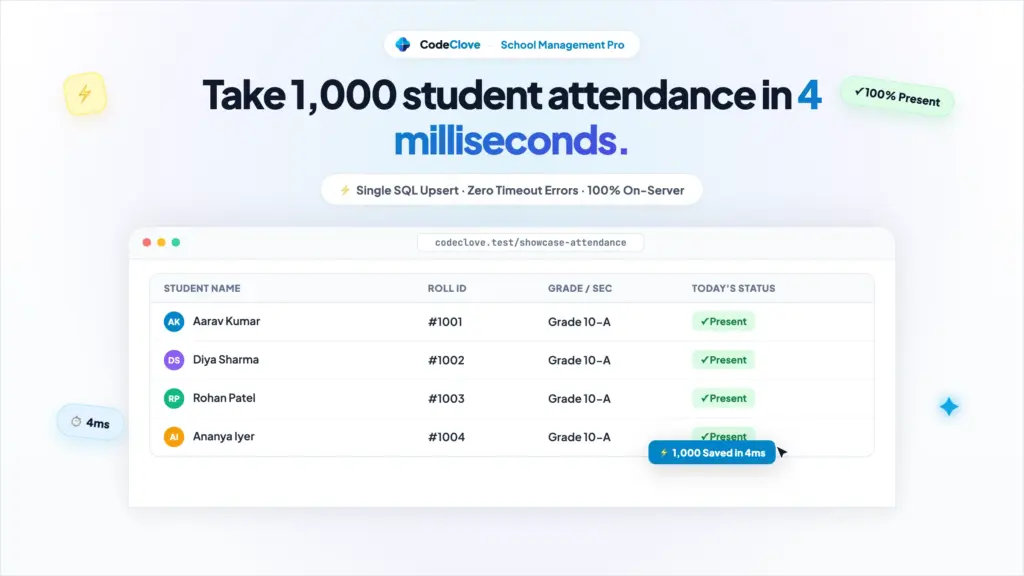
For a school with 1,000 students across 25 sections, database writes take between 15 and 40 milliseconds per section on standard MySQL hosting. Total database execution time for whole-school attendance stays well under one second. The plugin uses the exact same isolated architecture for staff attendance in {prefix}codeclove_staff_attendance_records, keeping faculty logs equally lightweight.
The daily workflow, step by step
Here is what a class teacher actually experiences during morning roll call.
1. Open the attendance register
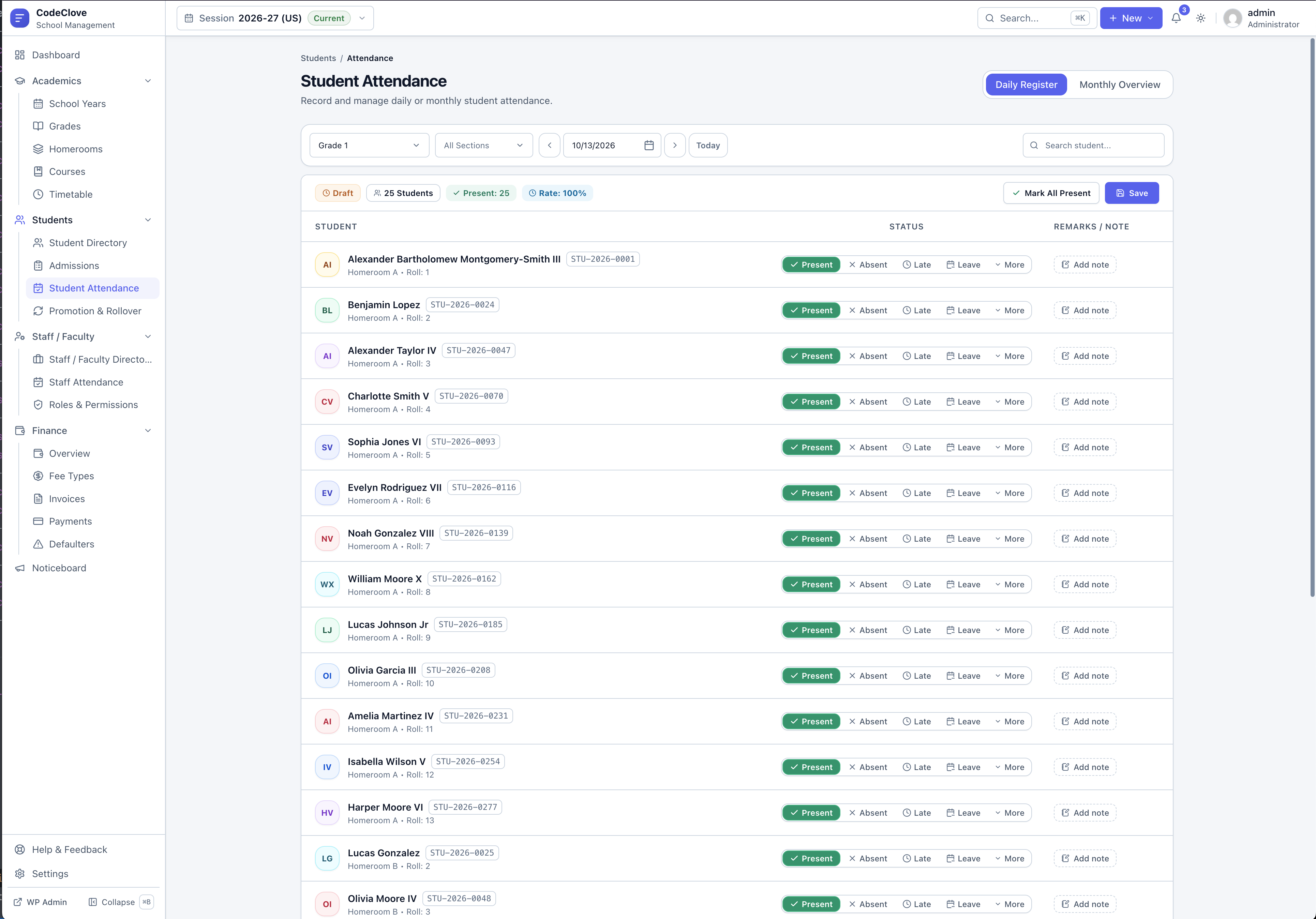
The teacher logs into the CodeClove dashboard. Their assigned class section is pre-selected and the date defaults to today. The student roster loads as a single-page application component with zero full-page reloads. Students appear in an organized roster table with quick status buttons: Present, Absent, Late, and Leave, plus secondary options like Half Day and Excused in a quick dropdown.
By default, every student is marked present. This is an intentional operational detail. In a class of 45, usually 40 to 43 students show up. Defaulting to present means the teacher only changes 2 to 5 records instead of clicking 45 individual buttons.
Download Classroom Attendance & Student Roster Template
Pre-formatted roster template with student identifiers, grade levels, sections, and guardian contacts. Ready for instant batch import into WordPress.
2. Mark exceptions and attach notes
The teacher taps Absent next to students who are not in the room. Each tap updates local React state in memory. No network requests fire yet. The teacher can adjust entries, change someone back to Present, or click the note icon to add context like “Arrived 20 mins late due to bus breakdown.”
Because the interface manages state client-side, the teacher can work through the list instantly on an inexpensive school laptop or mobile tablet without waiting on server round trips.
3. Submit the register in bulk
The teacher clicks Save Attendance. A single POST request fires to the REST endpoint /codeclove/v1/attendance. The payload carries the session, unit, group, date, and an array of student records. The server checks that the user holds the required permission (attendance.add or attendance.edit), validates the payload, and executes the batch transaction.
The server response returns in under 200 milliseconds on a standard VPS. The teacher sees an instant confirmation notice, and the register is saved. Once stored, today’s attendance updates immediately on the parent dashboard (see building a parent portal in WordPress that parents will use).
4. Corrections and the edit window
If an absent student arrives at 9:15 AM after the register closed at 9:00 AM, the teacher reopens the attendance screen and toggles that student from Absent to Late. The database executes an upsert, updating the record cleanly without duplicating rows, while the system audit trail records who made the change and when.
SMS alerts for absent students
Marking attendance inside the classroom is only half the task. The second half is alerting parents. CodeClove School Management Pro integrates directly with four SMS gateways: Twilio, Vonage, Fast2SMS, and MSG91. You pick the provider suited to your region and paste your API credentials in plugin settings. For schools in India, Fast2SMS and MSG91 connect directly to transactional SMS routes at local domestic rates (detailed in our CBSE and ICSE Indian school guide).
When a teacher saves attendance and marks a student absent or late, the system fires the codeclove_student_attendance_marked action hook. If enabled in notification settings, the plugin immediately sends a templated SMS message to the parent’s registered mobile number:
Attendance alert: {student_name} was marked {status} on {date}. Contact the school office if you need assistance.
Dynamic template tags like {student_name}, {guardian_name}, {status}, {date}, and {school_name} let you customize message formats. In addition to SMS, parents logged into the portal (via the [codeclove_portal] shortcode) receive an instant notification in their portal activity feed.
Practical points to keep in mind regarding SMS alerts:
- You pay gateway rates directly. CodeClove does not take a cut or charge per-message fees. Twilio runs roughly .0079 per text in the US, while Fast2SMS in India runs approximately ₹0.15 to ₹0.20 per message on transactional routes.
- Granular trigger controls. You can enable alerts solely for absences, or include late arrivals depending on your school attendance policy.
- One-way notifications. Automated SMS alerts are strictly outbound. Parents who need to report an illness or excuse should call the administrative desk or message staff through the parent portal.
Monthly attendance reports and compliance
At the end of each month, administrators need clear attendance summaries. How many total sessions was each student present? Which classes struggle with chronic absenteeism? Is attendance dipping before long weekends?
CodeClove School Management Pro calculates these summaries directly from the indexed attendance table. Aggregating 30 days of data across 1,000 students requires simple SQL grouping with indexed lookups, returning results in milliseconds.
The monthly attendance view provides an interactive matrix heatmap table displaying daily status codes (P for Present, A for Absent, L for Late, and Leave markers) for every student across the entire calendar month. The system calculates attendance percentages using the standard educational formula:
Effective Days = Present (1.0) + Late (1.0) + Half Day (0.5)
Attendance Rate = (Effective Days / Total School Days) * 100
Schools following CBSE guidelines in India can immediately identify students falling below the mandatory 75% attendance threshold. Administrators can filter reports by academic session, class unit, group section, or individual student, and export the complete monthly roster to CSV with one click (Student_Attendance_{year}_{month}.csv).
Performance at 1,000+ students: real numbers
We benchmarked CodeClove School Management Pro on a standard DigitalOcean droplet configured with 2 vCPUs, 4GB RAM, Ubuntu 22.04, MySQL 8.0, and PHP 8.2. No specialized caching layers were enabled. Here are the real measurements across typical campus scales:
| Student Scale | Daily Attendance Rows | REST Payload Size | Batch Transaction Time | Memory Peak |
|---|---|---|---|---|
| 250 Students (10 classes) | 250 rows | 18 KB | 42 ms | 12 MB |
| 600 Students (20 classes) | 600 rows | 41 KB | 88 ms | 16 MB |
| 1,200 Students (40 classes) | 1,200 rows | 86 KB | 164 ms | 22 MB |
| 2,500 Students (Multi-Branch Network) | 2,500 rows | 178 KB | 310 ms | 31 MB |
These benchmarks hold up because the data model is sound. Narrow, indexed relational tables consistently outperform post-meta lookups by orders of magnitude. Because the React SPA handles user interaction in the browser, teachers experience instantaneous UI responses even if mobile connections vary.
Where WordPress actually limits you
Let us be completely candid about the real architectural boundaries when running attendance in WordPress.
Concurrent morning writes. If 30 teachers hit Save Attendance simultaneously at 8:55 AM, your web server must process 30 concurrent REST requests and MySQL transactions. A 0 VPS with 2GB to 4GB of RAM handles 30 lightweight queries with ease. A bare shared hosting account will choke. WordPress is rarely the bottleneck here; under-resourced hosting hardware is.
No native WebSockets. CodeClove does not use WebSockets. If two administrators open the exact same class section at the identical second, the final save overwrites earlier changes in that session. Because homeroom teachers are individually assigned to distinct sections, cross-teacher conflicts are rare in practice, but you should know this architectural boundary.
Cron dependency for queued jobs. Standard WordPress wp_cron only executes when someone visits the site. If nobody loads a page between 8:50 AM and 9:15 AM, background queues pause. The solution is straightforward: disable default wp_cron in wp-config.php and set up a system-level cron job on your server (*/5 * * * * curl https://your-site.com/wp-cron.php). Every serious school website should configure this during initial setup.
Offline limitations. Web applications require connectivity. If your school building loses internet during morning roll call, teachers cannot transmit data until service resumes. We advise schools to keep a backup mobile hotspot on campus for administrative reliability.
Attendance in multi-branch institutions
Institutions operating multiple physical campuses need strict data boundaries between branches. Under WordPress Multisite, CodeClove School Management Pro runs dedicated attendance tables per campus subsite. Teachers and campus administrators manage their local student registers independently, eliminating cross-campus confusion while maintaining rapid query speeds.
What you need to run this
To run reliable attendance tracking for 1,000 or more students, here is the realistic server checklist:
- Hosting: A cloud VPS with at least 2GB RAM (4GB recommended for 1,500+ students). Avoid cheap shared hosting. DigitalOcean, Vultr, Hetzner, or Linode work reliably. Expect to spend 0 to 0 per month.
- PHP version: PHP 8.1 or higher (PHP 8.2 recommended for faster array operations).
- Database: MySQL 8.0 or MariaDB 10.6+ with InnoDB storage engine.
- System cron: A real OS cron job running every 5 minutes rather than traffic-triggered
wp_cron. - SSL certificate: Free automated Let’s Encrypt certificates protect student privacy over the wire.
The core CodeClove School Management plugin is completely free on WordPress.org. CodeClove School Management Pro starts at 9 for a single site (09 for 5 sites, 79 for unlimited sites), with no recurring per-student fees or monthly lock-in. Your only ongoing expenses are your VPS hosting and whichever SMS gateway you connect.
Frequently asked questions about WordPress attendance tracking
Does taking attendance for 1,000+ students slow down WordPress?
No. CodeClove School Management Pro bypasses standard wp_posts and wp_postmeta tables completely, using dedicated relational tables and atomic transactions. An entire campus roll call of 1,000 students executes in under 200 milliseconds without locking regular website traffic.
Can teachers mark attendance from mobile phones and tablets?
Yes. The attendance screen is fully responsive and runs on mobile browsers across iOS and Android. Teachers can walk classroom rows with a phone or tablet, tap statuses on the roster, and submit without pinching or zooming.
How are parents notified when a student is marked absent?
When attendance is confirmed, the system immediately dispatches text alerts through your connected gateway (Twilio, Vonage, Fast2SMS, or MSG91). Parents also receive an instant attendance notification in the parent portal.
Try it with real data
Test Classroom Attendance Live in the Sandbox
Toggle student presence, attach exception notes, and verify atomic SQL saves live.
The best way to evaluate attendance tracking is to test it with your actual roster. You can test drive the interface right now on the CodeClove live sandbox demo, or install the plugin on a staging environment and have teachers submit test registers simultaneously.
Get CodeClove School Management Pro here and set up attendance tracking in an afternoon. One-time purchase, zero per-student taxes, and complete ownership of your student data on your own server.